
Learn how to export your Contacts in multiple formats.
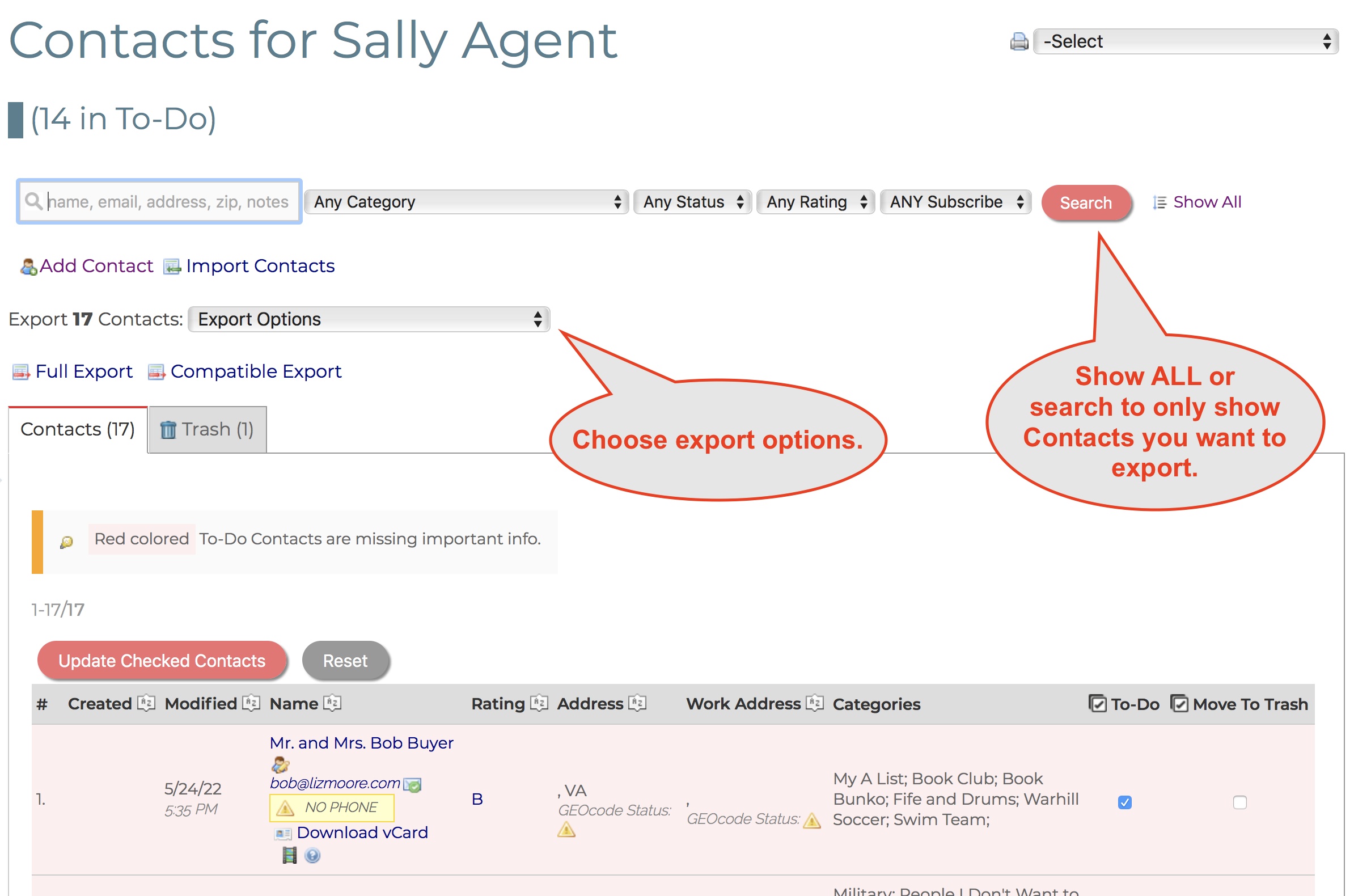
1. Go to All Contacts.
2. Search for the Contacts you want to export or show all Contacts. Whatever is in your current result set will be what is exported (with one exception below).
3. With the screen showing the Contacts you want to export, choose one of the Export Options.
- Full Export - exports virtually all fields. Useful for backing up Contacts.
- Connections Compatible Export - exports only most used fields in a format immediately ready for import into Connections. Useful for transferring Contacts to another Connections user.
- Quantum Compatible Export - exports only physical address info. Useful for compatibility with QuantumDigital requirements.
- Backup All Contacts - exports ALL your Contacts regardless of current search. Useful for creating a periodic backup that can be used by Help Center to fully restore your Contacts.
Comments
1 comment
Trying to export one contact to give to another LMA Realtor. When I select full export I get the info below. Can I get some help with the export.
SELECT IF(istodo = 1 AND (contact_fname = '' OR contact_lname = '' OR contact_addr1 = '' OR contact_address_city = '' OR contact_address_st = '' OR contact_address_zip = '' OR contact_email = '' OR (IFNULL(contact_home_phone, '') = '' AND IFNULL(contact_cell_phone, '') = '' AND IFNULL(contact_work_phone, '') = '')), 1, 0) AS INCOMPLETE, CASE WHEN IFNULL(contact_cell_phone, '') != '' THEN contact_cell_phone WHEN IFNULL(contact_work_phone, '') != '' THEN contact_work_phone ELSE contact_home_phone END AS PHONE_DEFAULT, IF(date_trashed > '0000-00-00', 1, 0) AS TRASHED, DATE_ADD(date_mod, INTERVAL 3 HOUR) AS date_mod, contacts.*, contact_fname, contact_lname, spouse_fname, contact_email, contact_home_phone, ishomephone_dflt, contact_cell_phone, iscontactcell_dflt, contact_work_phone, iscontactwork_dflt, contact_addr1, contact_work_addr1, contact_addr2, contact_work_addr2, contact_address_city, contact_work_city, contact_address_st, contact_work_st, contact_address_zip, contact_work_zip, contact_neighborhood, contact_category.catID, GROUP_CONCAT(category_descr, ';' SEPARATOR ' ') AS CATEGORIES, GROUP_CONCAT(DISTINCT '[', categories.catID, ']') AS CAT_IDS, label_text, istodo, rating, IF(latitude IS NOT NULL && longitude IS NOT NULL, 1, 0) AS GEOCODE_STATUS, IF(lat_work IS NOT NULL && lon_work IS NOT NULL, 1, 0) AS GEOCODE_WORK_STATUS, CONCAT_WS(' ', contact_addr1, contact_address_city, contact_address_st, contact_address_zip) AS LOCATION, CONCAT_WS(' ', contact_fname, contact_lname) AS CONTACT_NAME, IFNULL(latitude, '0') AS latitude, IFNULL(longitude, '0') AS longitude, SQRT((69.172 * (contacts.latitude - ?)) * (69.172 * (contacts.latitude - ?)) + (53.0 *(contacts.longitude - ?)) * (53.0 *(contacts.longitude - ?))) AS DISTANCE, SQRT((69.172 * (contacts.lat_work - ?)) * (69.172 * (contacts.lat_work - ?)) + (53.0 *(contacts.lon_work - ?)) * (53.0 *(contacts.lon_work - ?))) AS DISTANCE_WORK, REPLACE(contact_work_notes, '
', '') AS contact_work_notes, REPLACE(spouse_work_notes, '
', '') AS spouse_work_notes, REPLACE(source_notes, '
', '') AS source_notes, REPLACE(notes, '
', '') AS notes FROM contacts LEFT JOIN contact_category ON contacts.contactID = contact_category.contactID LEFT JOIN categories ON contact_category.catID = categories.catID WHERE contacts.AgentID = ? AND MATCH(salutation, contact_fname, contact_lname, spouse_fname, spouse_lname, contact_neighborhood, contact_addr1, contact_addr2, contact_address_city, notes, source_notes, contact_work_notes, spouse_work_notes, contact_email) AGAINST('dupree') AND istodo LIKE ? AND rating LIKE ? AND subscribe LIKE ? AND IFNULL(date_trashed, '0000-00-00') = '0000-00-00' GROUP BY contacts.contactID HAVING (CAT_IDS LIKE ? ) OR CATEGORIES IS NULL ORDER BY contact_lname
Can't find FULLTEXT index matching the column list
Please sign in to leave a comment.